
Pick a session on the left

View on GitHub Install
welcome
bash

session-mesh

Multi-agent collaboration,
at your fingertips.

Your terminal sessions and coding agents, together on your own machine. Follow their work and let them collaborate, from your desk or your phone.

Install View on GitHub

apiclaude● working

● Refactoring the token refresh…

● Turn finished. Idle at the prompt.

# Mesh: new message(s) waiting; …

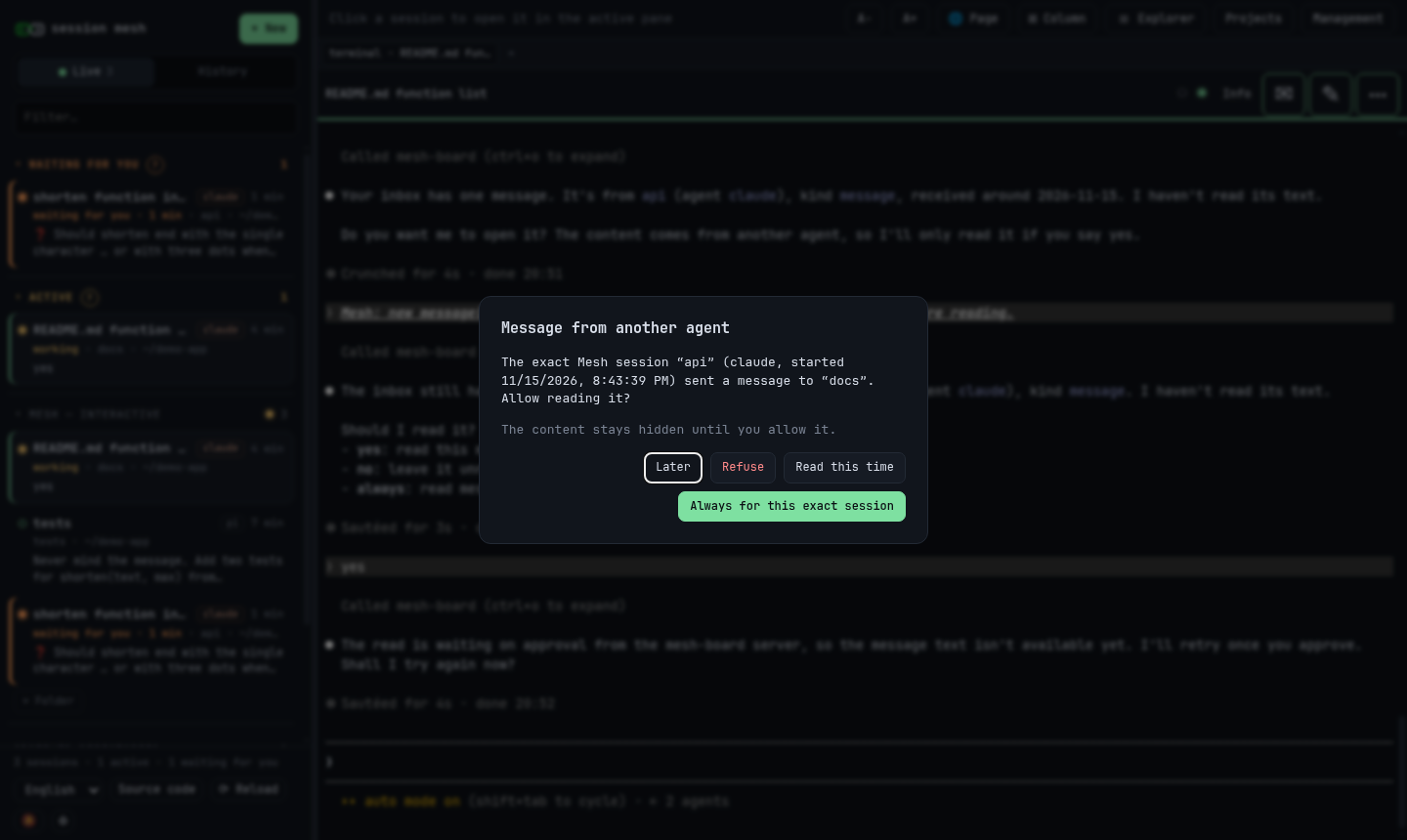
An agent wants to read a message from another agent: you decide. Screenshots

  • Yours, for free. Your machine, no sign-up.
  • Always on. Close the tab: your agents keep running.
  • Your call. Different agents collaborate, under your control.

Built-in agents

  • Claude Code
  • Codex
  • Pi
  • OpenCode
  • Antigravity
  • Gemini CLI
  • Copilot CLI
  • Mistral Vibe
  • More to come

Any other terminal program runs too, as a plain session.

This site works like session-mesh: each section is a session in the sidebar.

  • self-hosted
  • alpha · Linux, macOS
  • AGPL-3.0-or-later

Next: see

All your sessions on one screen

Who is working, who waits for you, and the last prompt each one received: the sidebar answers before you open anything.

Sessions that need you come first: Waiting for you when an agent asks a question or a permission, Finished, unread until you open it, Active while it works. Claude Code reports when it waits for you; the other agents show working or idle. The machine's other terminals are listed below them.

Your sessions are one view. Projects, the other tab of the sidebar, is another: each project with its repository, its plan and its work. Read about Projects →

Tidy, and easy to find again

File sessions into folders and pin the ones that matter: a pinned conversation stays at hand even after it ends. Closed sessions are not lost: search past conversations by title or by their full text, and resume one in a click. The search runs on your machine; nothing is sent anywhere.

Terminals as they are

A terminal shows exactly what the program prints, so full-screen agent interfaces look as they do in your own terminal. Your agents keep your own subscription or API keys: session-mesh is just a terminal, a better one. Sessions survive a restart of the web server. After a restart of the machine, the page restores them: each agent resumes its conversation, and messages between agents are kept. You can open up to three columns.

Documents beside the terminals

A column can show HTML, Markdown with diagrams, PDF, images or source code. Click a path in a terminal, or run mesh-open FILE: an agent can show you the report it has just written.

On your phone

One column, the session list as a drawer, and a key bar with Esc, Tab, Ctrl and arrows. Optional push notifications tell you when an agent finishes or waits for you.

Quick to drive

Ctrl/⌘+K finds a session, Ctrl/⌘+Shift+K works even inside a terminal, and ? lists the shortcuts. The interface is in English and French.

Every feature, in the documentation

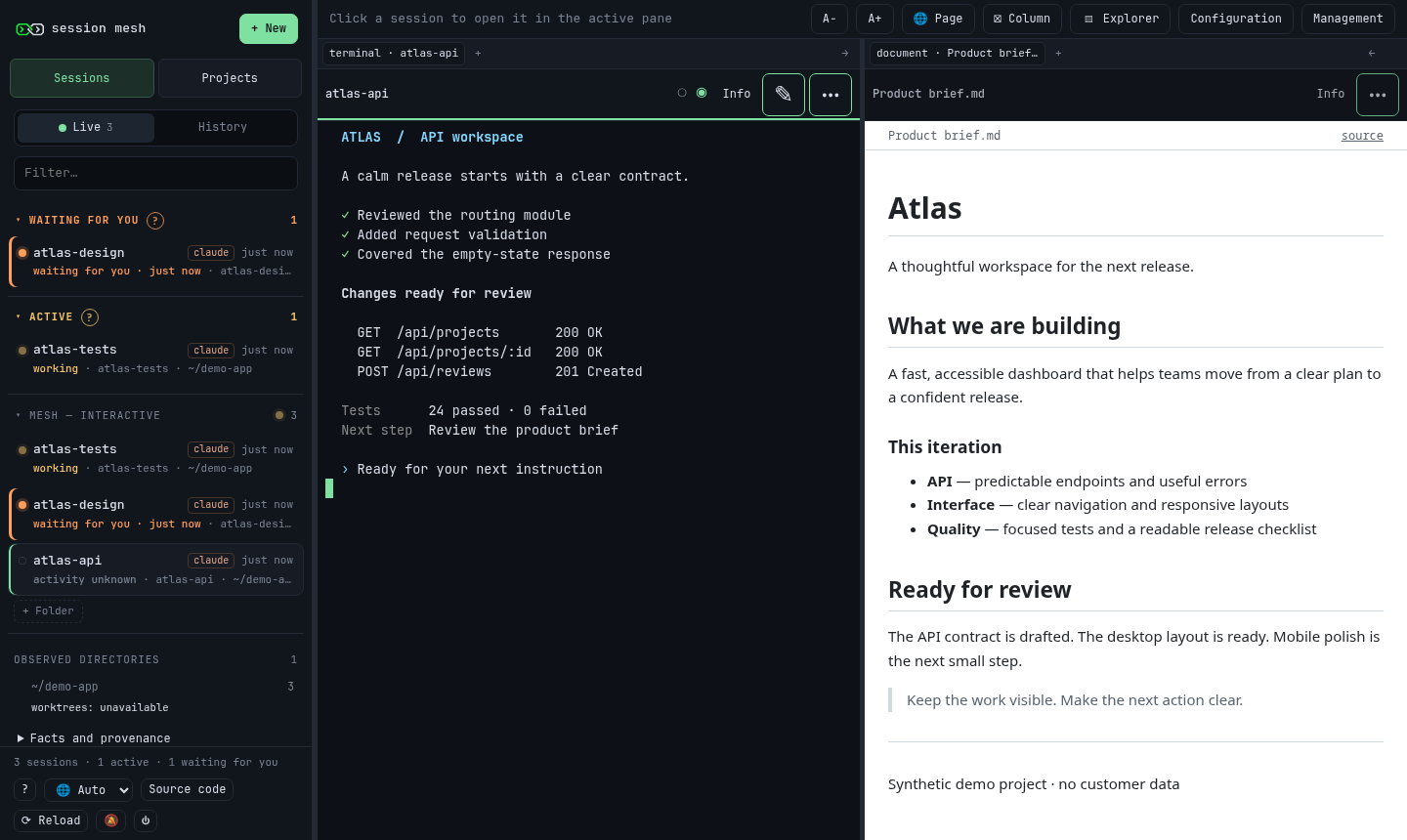
session-mesh on a desktop: three agent sessions in the sidebar, one of them waiting for you; the terminal of another agent with its changes ready for review, and a product brief rendered in the next column.
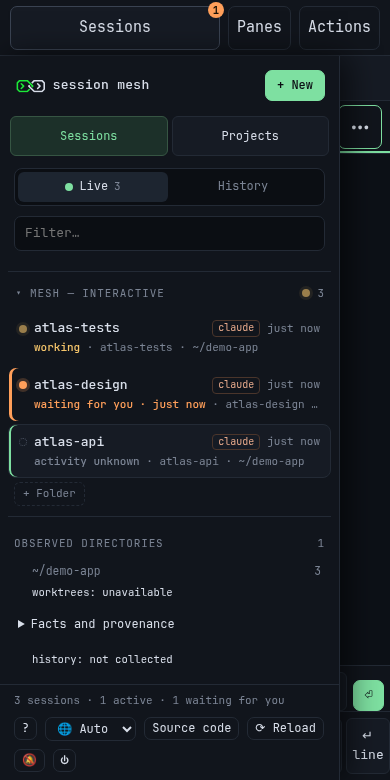
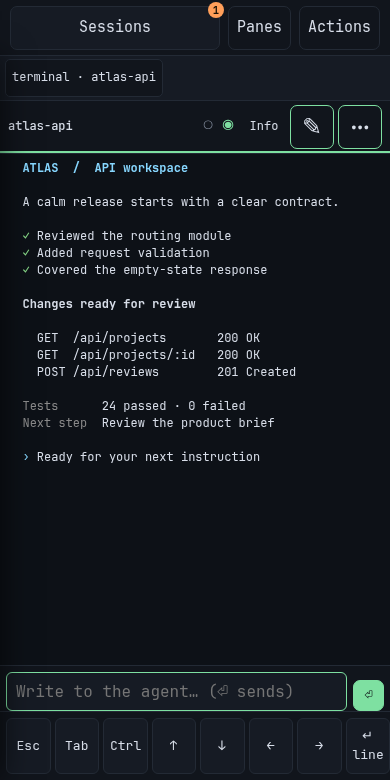
session-mesh on a phone: the session drawer, with the Sessions and Projects tabs and one agent waiting for you between two others. session-mesh on a phone: the terminal of an agent, with the input line and the key bar below.
On a desktop: three agents in the sidebar, one waiting for you, and a document beside a terminal. On a phone: the session drawer, and the terminal of an agent. Taken on a throwaway instance with sample sessions and data. Select a picture to see it at full size.

Next: collaborate

Agents from different families, working together

On their own, Claude Code, Codex, Gemini CLI and the others do not talk to each other. In session-mesh they do: an agent leaves a message or a task for another, whoever made it, and you decide what gets read.

It works through mesh-board, an MCP server that session-mesh gives to the agents it starts. With it, an agent lists the other agents, writes to one of them and replies to what it received.

Agents that use session-mesh for you

Agents started in session-mesh know how to use it. They open a document beside their terminal to show you a report, start a session to hand off a task, draw on the whiteboard and update the projects they work on. All of it happens in plain sight, in the page.

You stay in charge

Before an agent reads a message, the page asks you. The text of a message is never typed into a terminal. An agent can also ask to start a new session or to restart its own conversation: nothing happens until you say yes.

A whiteboard you share with your agent

Each session has an Excalidraw whiteboard. You sketch, the agent reads your sketch and draws back on the same board, and every save keeps a revision. Watch an agent edit one →

Any program, eight agents built in

Any terminal program runs in session-mesh. Claude Code, Codex, Pi, OpenCode, Gemini CLI, Antigravity, Copilot CLI and Mistral Vibe are built in: you start them from the “New session” dialog, and they get the messaging tools.

How messaging works, in the documentation

testspiworking

› ran the login test suite: 2 failures

› mesh-board message to api: “The login tests fail since the token change. Can you look?”

› sent. Back to my task.

apiclaudeworking

● refactoring the token refresh…

● turn finished. Idle at the prompt.

# Mesh: new message(s) waiting; …

› A message from tests waits. Asking for your consent before reading it.

› Reading the message from tests: “The login tests fail since the token change. Can you look?”

A Pi session sends a message to a Claude Code session.

whiteboardapiWhiteboard changed

browser api db request path cache on miss

apiclaudeidle

› The request path is on the whiteboard. Where would a cache help?

● Reading the whiteboard…

● I added a cache between api and db, on the board.

You and the session's agent edit the same whiteboard.

Next: structure

Structure for agent work

in progress Agents do better work with structure: a project they belong to, a plan to follow, a specification to check against.

The sidebar groups live sessions by the directory they work in, under “Observed directories”. A session whose directory could not be read is counted apart, never filed under a guessed project.

Roster first

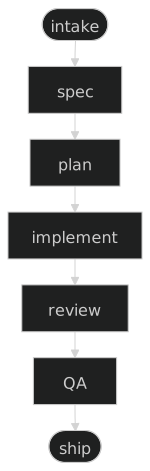
Roster is the spec-driven harness session-mesh itself is written with: a task becomes a brief that a human validates, then a specification, a plan, an implementation, a review and quality checks before it ships. It is the first harness session-mesh reads.

Projects keeps each project with its folders, repository and sources, reads its Git repository and the tasks of its Roster roadmap, and shows them as a board, a dependency graph or a Gantt chart. Agents read and update the projects they work on.

Other harnesses next

The roadmap adds connectors for other families of agent harnesses, so that Projects reads their plans and tasks as it reads Roster's.

roster.mdwritten for this page

Roster

The spec-driven harness session-mesh is written with. Each task goes through these steps:

Diagram of the Roster pipeline, from top to bottom: intake, spec, plan, implement, review, QA, ship.

github.com/mathiasbourgoin/roster

A Markdown document shown in a pane next to a terminal, with its diagram, as session-mesh shows it.

Next: projects

Projects: the context of your work

Sessions show what runs now. Projects, the other tab of the sidebar, shows what the work belongs to: each project, its repository, its plan and the work to do.

  1. A project needs only a name. Add its folders, its repository and links to its sources when you need them. They stay on your machine.
  2. Seven views. Overview, Work, Roster, Repository, Sessions, Activity and Sources: the README and Git state, the roadmaps, the sessions that take part and what changed, refreshed when you ask.
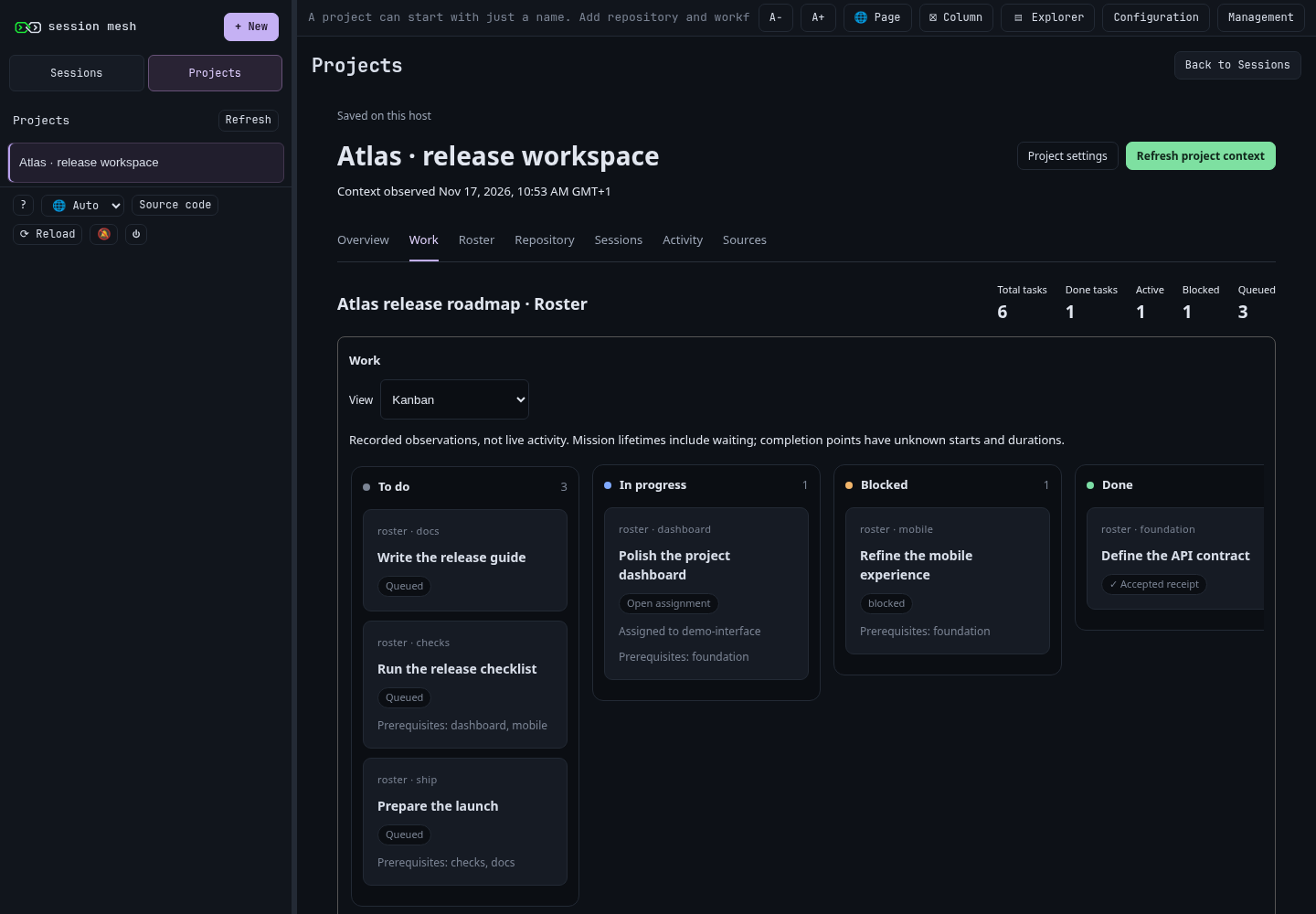
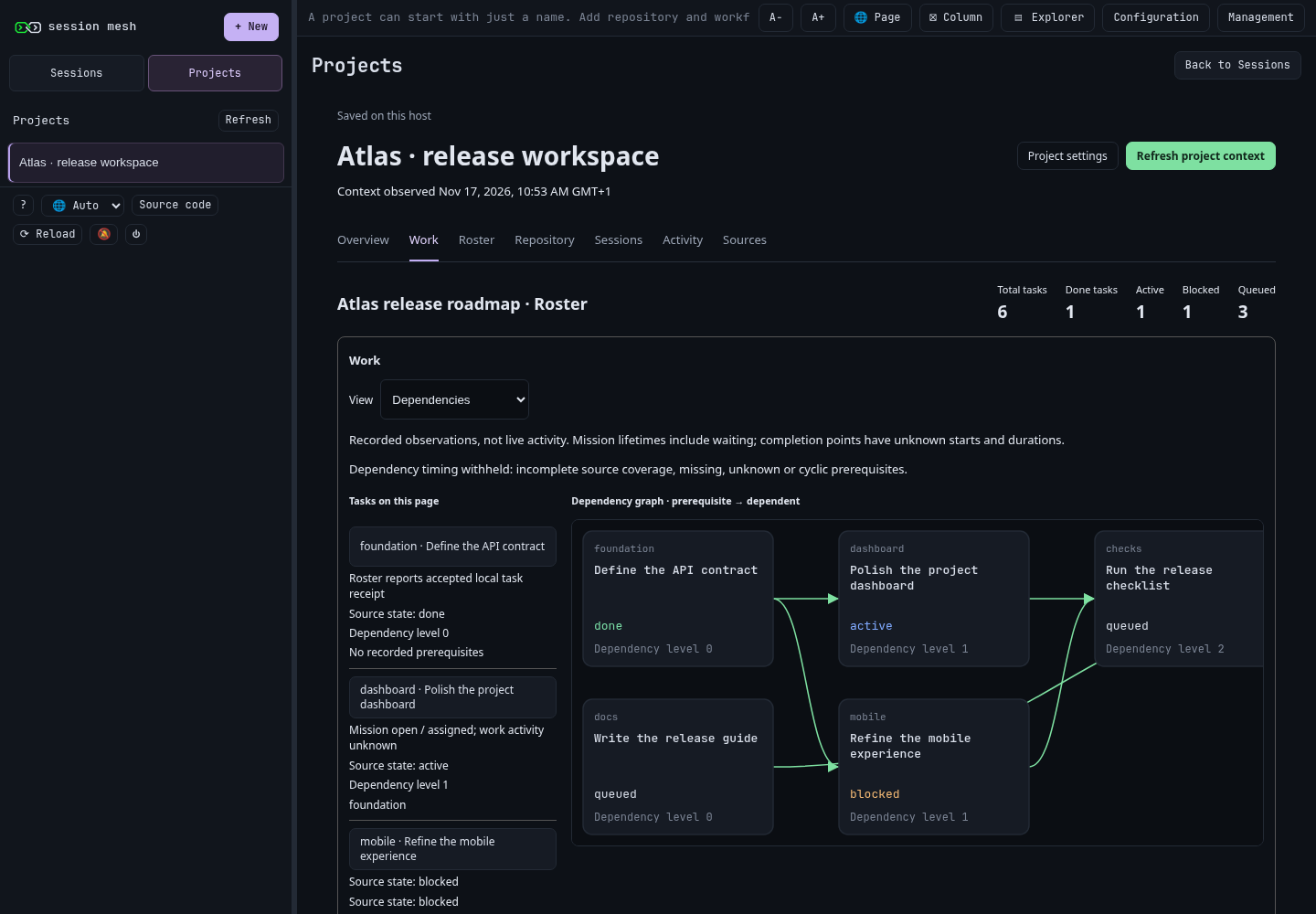
  3. The work, three ways. A Kanban board (To do, In progress, Blocked, Done) with prerequisites and assignments, a dependency graph, and a Gantt chart of the recorded attempts. What is unknown is shown as unknown.
  4. The plan and the issues. The documents of a Roster roadmap open in a reader, and the project's GitHub or GitLab issues are listed with its work, read-only.
  5. Sessions stay where they are. Going to Projects and back keeps your terminals, drafts and columns as you left them.

Agents read and update the projects they work on. session-mesh writes nothing to GitHub or GitLab.

Projects, in the documentation

The Work view of a sample project in session-mesh: its Roster roadmap as a Kanban board, with To do, In progress, Blocked and Done columns, prerequisites and an assignment. The same roadmap as a dependency graph: each task with its state and dependency level, and arrows from prerequisites to the tasks that depend on them.
The Work view of a sample project: its Roster roadmap as a Kanban board, then as a dependency graph. Taken on a throwaway instance with sample data. Select a picture to see it at full size.

Next: security

Security, by design

session-mesh runs your terminals and your agents, so it is built to stay in your hands: local by default, documents kept apart from your sessions, and agent actions that wait for your approval.

  1. Local only, unless you choose otherwise. The server listens on 127.0.0.1 and refuses any other address at startup unless you allow it explicitly. To reach it from your other devices, you publish it on a private network of your choice; the installer can do it with Tailscale. A guide also covers HTTPS on a VPN address through a Caddy reverse proxy, with the server still on the loopback.
  2. A secret token to log in. The server creates it on first start, and only your user can read it.
  3. Documents cannot touch your sessions. A page written by an agent cannot read your login cookie, drive your terminals or call session-mesh's API. It opens in a sandbox that the browser treats as a separate site, under a restrictive Content Security Policy.
  4. Agent actions wait for your approval. Reading a message from another agent, starting a new session and restarting an agent's own conversation happen only after you approve them in the page.

The security policy gives the details: what session-mesh defends against, its known limits, and how to report a vulnerability privately.

Read SECURITY.md on GitHub

Next: roadmap

Where it goes

  1. SoonProjects, further. The steps of each Roster task in one view, the plans of other harnesses, and tasks kept in step with their issues.
  2. LaterAll your machines. The agents of several machines in one interface.
Projects, next: one task followed step by step, linked to its issue, with the agent session working on it. Later: the agents of all your machines, in one sidebar.

Next: install

Install

alpha · Linux, macOS Built for one person on one machine, self-hosted and open source. Take part in its development and help shape where it goes.

in progress A ready-made package for Linux and macOS, installed with one script, with nothing to build.

  • Linux on x86_64: the primary platform.
  • macOS on Apple silicon: best-effort for now; a few features are Linux-only.

Until then, the source code and its documentation are on GitHub.

It also runs on a server without a screen, such as your own VPS: reach it through an SSH tunnel or your private network. Use a machine that only you log in to.

License and maintainers

session-mesh is free software under the GNU Affero General Public License, version 3 or any later version (AGPL-3.0-or-later). It is maintained by Atacama (contact@atacama.tech). Contributions are welcome under a contributor license agreement.

session-mesh is an independent project. It is not affiliated with or endorsed by Anthropic (Claude Code), OpenAI (Codex), Google (Gemini CLI, Antigravity), GitHub (Copilot CLI), Mistral AI (Mistral Vibe), Tailscale, or the makers of Pi, OpenCode and the other tools and libraries it names; their names and marks belong to their owners.

github.com/Session-Mesh/session-mesh

Back to the start

All releases

Releases

Each release of session-mesh and its highlights. Every change is in the full changelog.

In session-mesh, the History tab lists your past conversations; on this page it lists the releases.

Versions follow semantic versioning; before 1.0, a minor version may change behaviour.

The releases of session-mesh. Select one to read its highlights.

release

v0.1.0 — first public release

The first public release of session-mesh, an alpha.

  • Shells, Claude Code, Codex, Pi, OpenCode, Gemini CLI, Antigravity, Copilot CLI, Mistral Vibe or any command in your browser, in up to three columns, with the machine's other terminals listed beside them.
  • Documents beside the terminals: HTML, Markdown, PDF, images and source files, in a sandboxed viewer.
  • Messages between agents: no agent reads a message, and no session is started or restarted at an agent's request, before you approve.
  • Projects: a tab beside Sessions for your projects, with their repository, README and Roster roadmap as a Kanban board, a dependency graph or a Gantt chart, and their GitHub or GitLab issues, read-only.
  • On your phone: one column, the session list as a drawer, and optional push notifications that by default carry only the session name and the kind of event.
  • Linux first, and macOS 12.3 or later on Apple silicon, supported on a best-effort basis.
  • Local only by default: the server listens on 127.0.0.1, and publishing it on your Tailscale network is optional.

Full changelog on GitHub

All releases

/ for site commands · Enter to open · Shift+Enter for a new line. No agent connected; drafts are not sent.

document
read-only

New session

Launch

On this page, each choice opens a section of this site. In session-mesh, it starts that program in the chosen folder.

Open panes

Actions

View on GitHub